AI & Creative Workflows · Case Study
AI Fashion News Automation
A daily research brief that builds itself — Google News RSS results retrieved, distilled into key points by AI, archived and delivered as one email.
01 — The Brief · The problem & the goal
Keeping up with developments across AI and fashion means searching the same topics again every morning, skimming for the few items that are actually relevant, and losing the rest. Nothing is kept, nothing accumulates, and the research starts from zero the next day.
The workflow turns a repetitive manual research task into a structured, repeatable daily process, while maintaining an archive that can accumulate over time.
02 — The Scenario · How it runs
- 01
Google News RSS
The scenario retrieves Google News RSS search results for topics including AI in fashion, fashion technology, digital fashion, costume design, AI for costume design, CLO 3D and generative AI for creative workflows.
- 02
Google Gemini AI
Gemini does not search. It reads the title and available description of each retrieved item and converts it into one concise, relevant key point.
- 03
Google Sheets
Each processed item is added as a row, building a research archive that accumulates over time.
- 04
Text Aggregator
All processed items from the run are merged into one readable brief instead of many fragments.
- 05
Gmail
The aggregated brief is sent as a single email rather than a scattered stream of notifications.
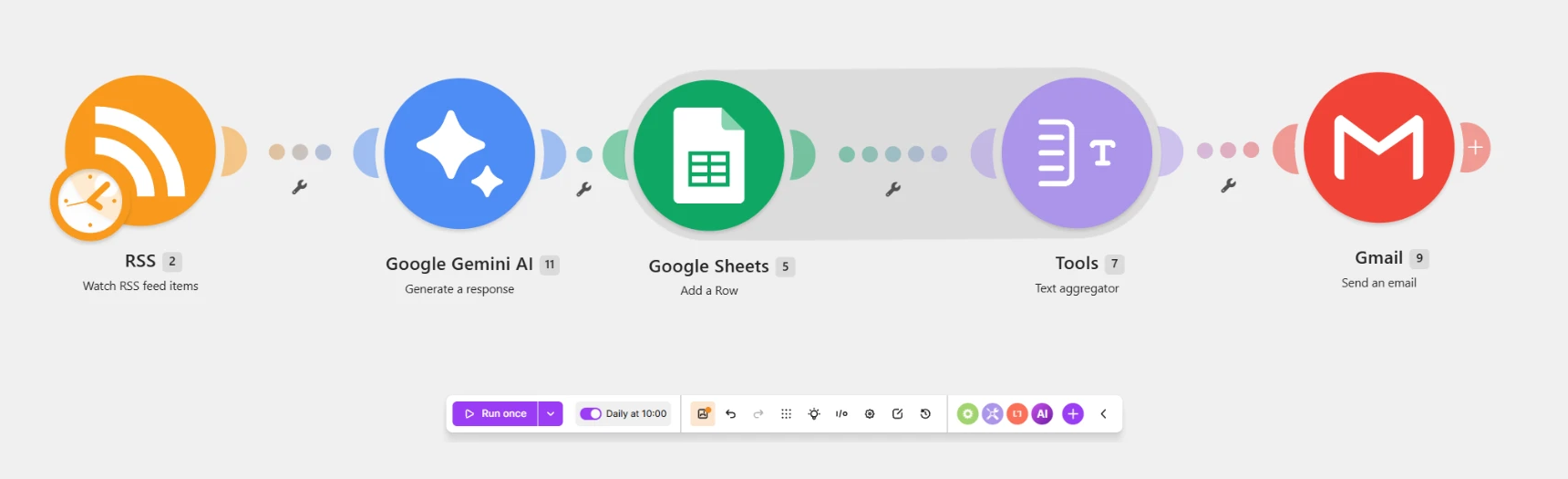
The live scenario in Make — RSS → Google Gemini AI → Google Sheets → Text Aggregator → Gmail
03 — Built With · Technology & tools
- Make
- The automation platform running the scenario on a daily schedule.
- Google Gemini AI
- Writes one concise key point per retrieved news item.
- Google Sheets
- A growing research archive of dated, structured entries.
- Gmail
- Delivery of the aggregated daily brief to one inbox.
04 — The Archive · What is stored
Date
When the item entered the archive.
Title
The headline of the retrieved news item.
Key Point
One concise point written by Gemini.
Link
The source link for the full article.
Date → Title → Key Point → Link
05 — One Workflow, Two Outputs
Research Archive
A structured Google Sheets archive containing Date, Title, Key Point and Link.
Daily Brief
One consolidated email containing the processed news items from the research run.
06 — Reflection · What I Learned
Building the workflow showed me that successful automation is not only about connecting tools. The structure of the information flow matters just as much.
One important design decision was aggregating the processed news before sending the email. Without aggregation, each article could become a separate notification; combining them creates one usable research brief instead.
The project also clarified where AI adds value in this workflow: not as the source of the research, but as a processing layer that turns incoming information into concise, structured key points.
07 — Next Iteration
Possible future directions, not part of the current workflow.
Duplicate Detection
Prevent repeated articles from entering the archive.
Relevance Scoring
Prioritize higher-value developments.
Automatic Categorization
Separate AI, Fashion Technology, Digital Fashion and Costume Design.
Trend Detection
Identify recurring technologies, companies and themes over time.
Weekly Intelligence Brief
Transform daily findings into a higher-level weekly summary.
PROJECT HANDBOOK
Explore the full workflow
A concise visual handbook documenting the workflow architecture, tools, information structure, key decisions and future development of the AI Fashion News Automation project.
Download Handbook · PDF